
Asset Detail
Rumble Creator Metrics Helper 4.0.1 - Fixed Extension Focus Loss on Refresh
App/Tool by therealtombi
Description
Rumble Creator Metrics Helper 4.0.1
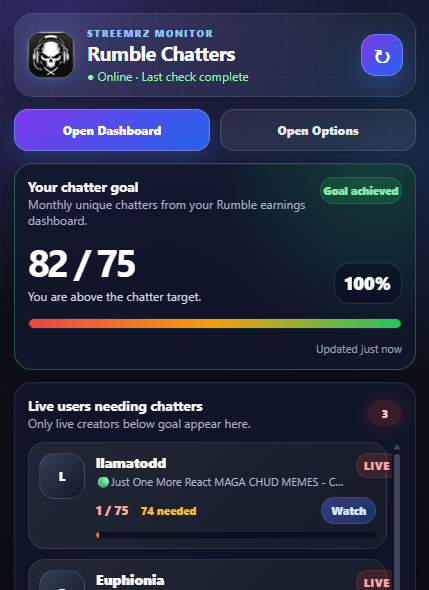
Rumble Creator Metrics Helper monitors two Rumble Creator Program goals:
- Unique Chatters — target: 75
- Watch Hours — target: 500
Two supported clients are available:
| Client | Behaviour | |---|---| | Chrome Extension 4.0.1 | Metrics are updated manually by the user | | Desktop 4.0.1 | Metrics are monitored automatically while the application is running |
Both clients use your Streemrz account and private Rumble Livestreaming API URL.
Chrome Extension 4.0.1
The Chrome Extension does not automatically open Rumble pages or popup/minimized windows.
Your own Creator Program values are updated only when you choose to update them.
Install
- Extract the Extension folder to a permanent location.
- Open
chrome://extensions. - Enable Developer mode.
- Press Load unpacked.
- Select the folder containing
manifest.json. - Open Options.
- Authenticate with Streemrz.
- Enter your private Rumble Livestreaming API URL.
- Save the settings.
Update your metrics
Open the Extension and press:
Update Metrics
The normal Rumble Creator Program dashboard opens or is brought to the front.
The Extension reads:
Total unique chatters this month
Hours watched this month
and reports the current values.
The dashboard is left open. The Extension does not create and close a hidden/minimized capture window.
You can also update your values simply by opening the Rumble Creator Program dashboard yourself.
Opening the Extension popup by itself does not update your own metrics.
Live support list
The popup can still display live creators who need Chatters, Watch Hours, or both.
Only outstanding goals are shown.
Your own qualifying live row is marked:
YOU
Desktop 4.0.1
Desktop is the automatic monitoring client.
It is available for Windows and Linux.
Desktop:
- keeps its own persistent Rumble login session;
- checks live status approximately every 60 seconds;
- refreshes Creator Program metrics approximately every 10 minutes while monitoring is enabled;
- can continue running in the system tray;
- can start with the operating system; and
- can refresh metrics while the creator is offline.
Windows install
Run:
Rumble-Creator-Metrics-Helper-Desktop-Setup-4.0.1.exe
Complete the installer and launch Rumble Creator Metrics Helper.
Debian / Ubuntu / Linux Mint
Install:
sudo apt install ./Rumble-Creator-Metrics-Helper-Desktop-4.0.1-amd64.deb
Linux AppImage
Make the AppImage executable:
chmod +x ./Rumble-Creator-Metrics-Helper-Desktop-4.0.1-x86_64.AppImage
Run:
./Rumble-Creator-Metrics-Helper-Desktop-4.0.1-x86_64.AppImage
If secure storage is not available on Debian, Ubuntu or Linux Mint:
sudo apt update
sudo apt install -y   gnome-keyring   libpam-gnome-keyring   libsecret-1-0   dbus-user-session   libappindicator3-1
Then log out/in or reboot.
Desktop first-time setup
Configure all three sections:
Rumble
Streemrz
Live API
Rumble
Press Login to Rumble and complete the normal Rumble login.
Streemrz
Press Authenticate and complete the Streemrz login/consent process.
Live API
Open Settings and enter your private Rumble Livestreaming API URL.
When setup is complete, Desktop shows:
MONITORING ACTIVE
Creator Program goals
Both clients track:
Unique Chatters: 75
Watch Hours: 500
Watch Hours are read specifically from:
Hours watched this month
Rumble compact values such as 5.41K are supported.
Only creators who are live and still need at least one goal appear in the shared support list.
Privacy and security
- Rumble passwords and MFA responses are entered on Rumble's own pages.
- Streemrz passwords and MFA responses are handled by Streemrz authentication.
- The private Rumble Livestreaming API URL remains local to the client.
- Each installation uses its own cryptographic device identity.
- Desktop uses operating-system secure storage.
- The Chrome Extension no longer performs scheduled/background dashboard capture.
Service
https://chatters.streemrz.com
https://streemrz.com
Comments 1
Log in to join the discussion.
Log In
Apologies, link was broken. This is the correct fixed links.
Rumble Creator Metrics Helper 4.0.1 - Fixed Extension Focus Loss on Refresh
by therealtombi